Archives par mot-clé : English

Veloid, THE Android software for users of bike sharing – including Bixi

I’ve been looking at any apps that would help someone find available bicycles with their Android-based phone.

I previously tried Velimap and MyCityBikes and liked them but they didn’t support Bixi. I contacted both their authors but didn’t get much further.

Yesterday I came across Veloid which suppor Bixi but also bike sharing networks in another 30+ cities! I find this very interesting for anyone traveling with their Android phones 🙂

I really like the interface, although the option menus differ from standard dialogs. The official website has a very nice flash animation that shows best all its features, this is an example of it using Bixi:

Veloid showing 2 Bixi stations

I also came across SpotCycle, developped by 8D Technologies. Recognize the name ? 8D is the creator of the parking meter systems in Montreal, which also run Linux internally. Proudly Québécois 🙂 And no, I am not affiliated to them in any way. Although minimalistic, Spotcycle works well and does its job. It only supports the Bixi networks in Montreal and Ottawa, though.

I am still confused as to why there is no obvious licensing information on most apps found on the Marketplace. I wish I could easily see if an app is GPL or not and I’d like to be able to report bugs and other stuff easily. I guess I have too many bad habits from Ubuntu 🙂 Perhaps any Ubuntu + Android users have found how to do this before me ? Granted I haven’t looked much into it I have the best excuse as I recently welcomed a 5 member in the family. It seems many Marketplace apps users only feedback mechanish is the comments section.

Anyways, I lacked the time to take any interesting screenshots today but I’ll try to post some more soon. Meanwhile, enjoy biking!

New discussion group for Android users in Canada

If anyone’s using an Android phone in Canada and wanting to get some help or just share their experience, come by to this new group:

Google Groups
Android users in Canada
Visit this group

I’ve found it surprisingly hard to find any information specific to the Canadian launch of Android phones by Rogers, other than Android in Canada, and most discussion elsewhere deals with the U.S. models or marketplace.

I just started the group so it’s mostly empty, but I’ll be sharing some of the trouble i am having, as well as some of the blog posts about new features, etc.

Which Android HTC Dream smartphone case ?

If you’re like me you want your phone with you all the time. HTC Dream phones and « smartphones » in general tend to be a bit bigger than regular cellphones, so most generic cases don’t fit. No biggie, this is Montreal, I should just be able to go to the next corner’s cell phone shop and get a proper case.

Not so fast!

I’ve had my phone for ~5 weeks now and during the first three weeks I couldn’t find a proper carrying case. Rogers doesn’t even carry any worth mentioning. And I mean none. Well, I’ve spotted some at the downtown store, but they were in hard plastic (go figure) or oversized and overpriced.

So every now and then, during lunch, when I spotted a cellphone accessories kiosk dowtown I would ask about a case for this phone. I went to La Source, Bell, La Cabine Téléphonique, etc. Hell, even the million-cases mini kiosks in underground Montreal couldn’t find anything for this phone!

Well guess what, Walmart near Décarie and Jean-Talon has it. I’ll spare you the details of why I ended up at Walmart, and I hate shopping there for a million reasons, but if the local shops can’t bother to carry something, I’ll gladly hand my money to WM. Although this applies to Montreal, this looks like a product at least a few stores carry online.

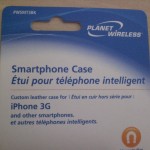
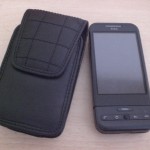
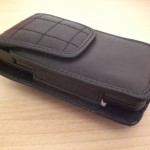
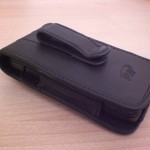
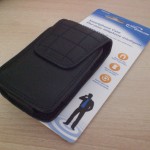
This Planet Wireless Smartphone Case (ref: PWSMT3BK) is made by Gentec International. Note the reference no., this one fits the HTC Dream perfectly. I can’t remember how much I paid for it, I think it was CDN$19.95. Not cheap, but not $40 like some cases at La Source!

Here, I thought I’d throw some pictures to illustrate this:

Taking Android screenshots from Ubuntu Jaunty

I’ve just added a detailed guide on how to take Android phone screenshots from Ubuntu Jaunty to the Ubuntu community documentation.

I kept following other guides and blogs without success until I came across this bug report about a missing udev rule for the Android devices. Ew!

I also noticed many guides indicate Eclipse + Android plugins (latest release, manually installed) are needed for this which is not the case! Dalvik Debug Monitor (ddms) works just fine without any other third-party, manually installed apps. This is what it should look like once it « sees » your phone:

ddms

It’s weird that taking screenshots isn’t easier, as this effectively prevents documenting and illustrating many interesting features. I hope the guide makes it easier for anyone to share their findings in using their Android devices. This should also help prepare training or support material, hint, hint 🙂

device

The above screenshot shows missed calls, USB connectivity status, Change Settings shortcut in notifications, TwitDroid pending dents (despite the name, it supports identi.ca which is what I use it for), Wifi connectivity status, Vibration mode, cell phone signal, battery status, alarm enabled and the current time, all in the status bar.

I also have a few widgets on the desktop (if that’s what it’s called…), otherwise I am using the default launcher and configuration.

Unless something specifically involves Ubuntu, I’ll mostly be posting only to Planet Android, which I recently joined. See you there (or here).

Hello Planet Android, from Quebec Canada

Hi there, I just recently got an HTC Dream phone and decided to join Planet Android to maximize the fun & sharing.

I am not going to say getting used to have a full computer + phone in my pocket, and on top of it being always connected was easy! But fun, yes. Useful, yes. Time-sink, yes 🙂

My main operating system both at home and at work is Ubuntu, so I’ll be posting about my personal and professional use of Android withing that context. I’ve started with the wiki page on portable Android devices, and I also post to the Android group in Identi.ca.

It’s puzzling that there don’t seem to be geographic-specific community groups for these, specially when you know they are, well, geographically tied to phone providers and GPS-enabled. If anyone in Quebec province (or in Canada, as Rogers provides service across Canada) is reading me, I’d like to hear ideas on where we can set a local resource: Google groups ? AndroidCommunity.com ?

I’ll start with my list of essentials as I am in week 3 of using this little marvel – which isn’t without its quirks. So stay tuned, and looking forward to read other non-developer stuff in Planet Android.